A quick way to refresh Android visuals with optional lock-screen rotation
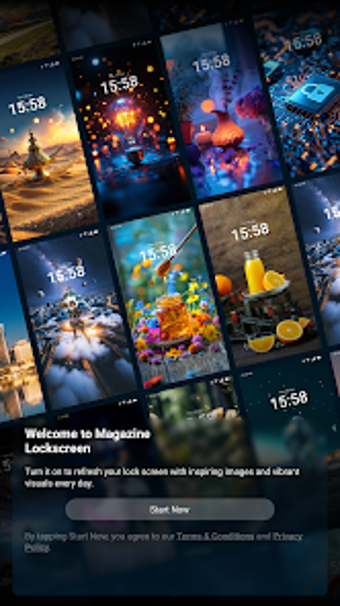
Lock Glimpse, by Chengyan He, helps Android users refresh their lock and home screens through automatic image rotation and a searchable wallpaper gallery. The app delivers a regularly updated set of curated images and in-app browsing tools, plus a full-screen preview mode to inspect quality before applying. It targets people who enjoy frequent visual changes on their phones, and owners of partner models that offer deeper system-level lock display support.
Pulls from a large, curated image library for daily variety
The app supplies a broad collection of HD wallpapers organized into named styles so users can find a look quickly. It offers categorized browsing across Minimal, Nature, Abstract, Techy and Aesthetic styles, and the catalogue receives daily content updates to keep choices fresh. For routine use, the gallery model helps people who change backgrounds frequently to browse and select new images without extra configuration.
Light footprint keeps it usable on modest Android devices
The app is designed to run on Android 10 and up and includes a lightweight implementation that the developer optimised for both high-end and budget phones. That optimisation reduces friction during ordinary browsing sessions and helps the gallery remain responsive when flipping through many images. This focus on low resource use makes it practical for daily wallpaper swaps on older or lower-powered hardware.
System-level automation is confined to a subset of partner OEMs
The automatic rotation feature depends on deep integration with select manufacturers and is not universally available across all Android handsets. On devices with the required System UI hooks the app can change the lock display automatically; on other phones it functions only as a standard wallpaper manager. This split behaviour means the app’s full automation is available only where the OEM exposes those system interfaces.
User concerns shaped how the feature is delivered
Reception has been mixed: many users like the curated visuals, while critics point to links on the lock display that act like external content and to reports of increased battery consumption when the rotation feature is active. Those complaints prompted the developer and partner manufacturers to make the automatic lock-change optional in later updates, changing how the feature is presented to the user base.
To sum up, a practical daily visual refresh with a notable caveat
The app is a useful choice for people who treat their phone as a changing visual canvas and want frequent, hands-off wallpaper variety; it is less suitable for anyone who needs a distraction-free lock display or strictly conservative battery use. Pro tip: disable the automatic rotation in the app or your device’s lock screen settings (toggle off the Lock Glimpse or Wallpaper Carousel option) if you prefer a static screen.